


Auto Text - Schedule Messages
4.54.38K Reviews
App Specs
- Version
- 6.0.8
- Updated On
- License
- Free
- Downloads
- 1,000,000+
- Developer
- Bizcraft Apps
- Categories
- Communication
- Platform
- Android
Screenshots
 Analysis by AppCompare
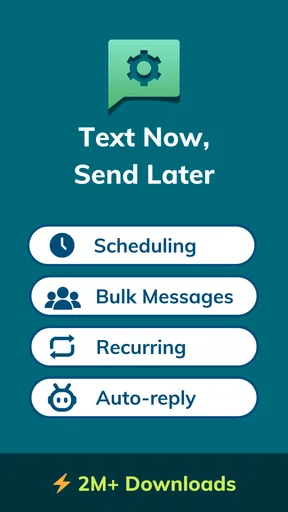
I find a message scheduler most useful when the timing matters more than the act of typing: a reminder sent before a shift starts, a greeting prepared ahead of a busy day, or a note written while I have a quiet moment rather than when someone needs it. Auto Text - Schedule Messages is built around that practical idea, with tools for scheduling SMS and WhatsApp messages, setting automatic replies, and sending messages in bulk. It is a communication app from Message Assistant, and I’d consider it when remembering to send something later is a recurring problem—not simply because I want another messaging inbox.
When a scheduled message depends on connectivity
Scheduling and delivery are separate steps, and that distinction is important. I can prepare a message in advance, but its arrival still depends on the relevant messaging service and the conditions around sending at the scheduled time. A schedule is a way to plan communication, not a guarantee that a recipient will see a message at an exact moment regardless of connectivity.
That matters most for time-sensitive messages. If I’m sending a routine reminder, a small delay may be harmless. If I’m communicating a last-minute change, I would not rely on a scheduled message as my only channel. I’d choose a live conversation or another way to reach the person, then use a scheduled text for the follow-up or reminder.
For WhatsApp in particular, I’d treat the schedule as a convenience that still sits within the realities of using a messaging platform. I would test the workflow with a low-stakes message before trusting it for something important, and check that the recipient and wording are right before leaving it queued. That quick check is more useful than assuming that “scheduled” means “certain to arrive.”
Useful in the middle of an ordinary day
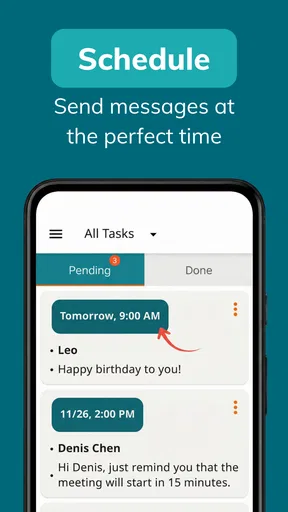
The strongest use case I see is preparing messages when I have time, then avoiding the mental clutter of remembering to send them later. I might draft a Monday meeting reminder at the end of Friday, or write a birthday greeting early so it does not get lost in a busy morning. The point is not to automate every conversation; it is to move predictable messages out of the way.
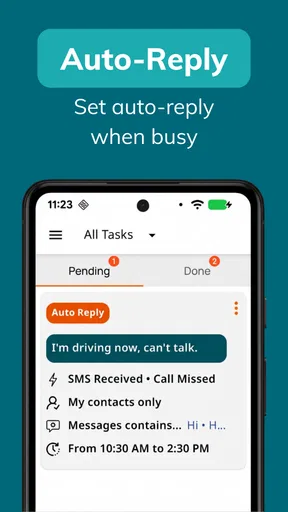
Automatic replies can help in a different situation: when I cannot respond promptly but want a basic reply to go out. I’d keep that message plain and useful, rather than making it sound like a personal response written in the moment. A short note setting expectations is a better fit than a reply that could confuse someone into thinking I’m actively reading and answering.
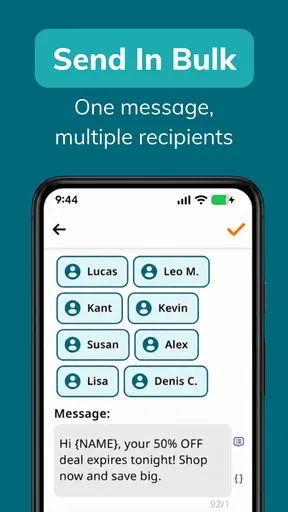
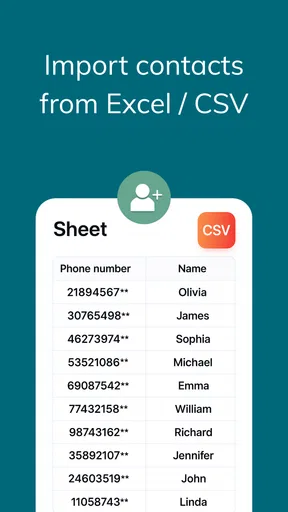
Bulk messaging has its own audience and trade-off. It can save effort when the same practical update needs to reach several people, but it also makes a mistaken message easier to repeat. I would prepare the wording carefully, review who should receive it, and avoid using a bulk send for something sensitive or personal. For a small, informal group, individual messages may take longer but feel more considerate.
Worth Reading Before You Choose

EA SPORTS FC Mobile 26 Is a Bigger Football Game, but It Takes Time

Flipboard Shows What News Apps Must Do Beyond the Feed

Switching to Android Auto Means Rethinking Your Driving Routine

Google Calendar Makes a Crowded Week Easier to Manage

Ludo King Makes the Most of the Minutes Between Plans

Baby Panda World Brings Quick Play to Modern Phones, but Its Game Library Feels Busy
Where it fits beside built-in messaging tools
Compared with using the standard SMS or WhatsApp app alone, Auto Text is appealing when the missing piece is planning: composing ahead, arranging a later send, or handling a repeatable reply. The usual messaging apps are still the natural choice for spontaneous back-and-forth, checking conversation context, and responding as a person in real time. I would not replace them; I would use this app as a supporting tool for messages that benefit from preparation.
Calendar alerts and reminders are another reasonable alternative. They prompt me to send a message myself, which is preferable when I need to confirm details at the last minute or tailor the wording to what has just happened. A scheduler is more convenient when the text is already settled and the timing is predictable. The choice comes down to whether I want a reminder to act or a message arranged in advance.
For someone who sends only occasional personal texts, a phone reminder may be simpler than maintaining a separate scheduling workflow. The app makes more sense when recurring reminders, planned greetings, or routine updates come up often enough that remembering them becomes work. It is less suitable when every message needs a fresh judgment at send time.
A low-risk way to build confidence
I would begin with a message to myself or a trusted contact at a convenient time, then confirm how the scheduled send behaves on my device. That small trial can reveal whether the process fits my habits before I depend on it for a meeting or an important personal occasion. It also gives me a chance to check the selected channel and the final text rather than discovering a setup mistake after the fact.
A useful habit is to include enough context in a scheduled message that it still makes sense when it arrives later. “Running late” can be ambiguous if plans change; “I’m running late for our 3 pm appointment” is clearer. For recurring messages, I’d also revisit the wording occasionally. A reminder that was accurate last month can become outdated when a meeting time or plan changes.
Automatic replies deserve a similar review. I’d make sure the message remains appropriate for the situations in which it might be sent and does not promise a response time I cannot meet. If I’m unavailable for only a short stretch, a simple acknowledgment is enough; if I’m handling personal or sensitive conversations, I may prefer to reply myself. Automation is most helpful when it removes a repetitive task without pretending to replace attention.
Limits worth weighing before relying on it
Scheduling adds a step between writing and sending, so it introduces its own chance of error: the wrong recipient, a stale message, or a time that no longer suits the plan. I’d review queued messages when my schedule changes, especially before travel, a shift change, or a canceled event. The more important the message, the more sensible it is to keep a backup plan rather than assuming automation will handle every exception.
There is also a social limit. A perfectly timed automated greeting can be thoughtful if it helps me remember, but repeated generic messages may feel impersonal. I’d use the app to support a genuine intention, then personalize the text enough to sound like me. For an emotionally significant conversation, I would choose a live exchange instead of trying to schedule a substitute for one.
The app is free to install, with in-app purchases ranging from $5.99 to $59.99 per item. I’d try the basic workflow first and decide whether the features I actually use justify any purchase, rather than paying for options I may never need. It has a 4.6 average from around 32,000 ratings, and more than one million installs, which suggests it has found an audience; those figures still do not tell me whether its particular workflow will suit my phone and routine.
Who should give it a try
I’d recommend exploring it if you regularly forget routine texts, want to prepare messages outside the moment they need to be sent, or have a clear use for automatic replies or bulk communication. It is aimed at everyday communication rather than replacing a full messaging service, so it works best when you already know what you need to say and want help with timing.
I’d skip it if you rarely schedule messages, need guaranteed delivery for urgent communication, or prefer to review every message in context before sending. People who rely on spontaneous conversation may get more value from their usual messaging apps and a simple reminder. The right choice depends less on how many features sound useful and more on whether delayed sending solves a real problem in your day.
The app is listed for Everyone, and its current version is 5.9.8. It has been available since January 13, 2016, and supports devices running Android 7.0 or later. I’d still check that the version and device requirements suit my phone before installing, then test the specific SMS or WhatsApp workflow I plan to use rather than assuming every setup behaves identically.
Overall, I see Auto Text - Schedule Messages as a practical planning companion, not a replacement for attentive communication. Its value is clearest when the message is predictable, the timing matters, and I can prepare it carefully. I’d use it for routine reminders and advance planning, keep a live alternative for urgent matters, and review scheduled messages when plans change. That balance lets automation save mental effort without asking it to do more than it reasonably can.
Ever found yourself in need of sending a message at a specific time but worried you might forget? Well, let me introduce you to Auto Text - Schedule Messages. It's like having a personal assistant for your messages, ensuring important texts go out exactly when you need them to. I’ve been tinkering with this app for a bit now, and it’s a real game changer!
What Does Auto Text - Schedule Messages Do?
At its core, Auto Text - Schedule Messages lets you schedule messages to be sent out at a predetermined time. Pretty straightforward, right? But it’s not just about the basics here. This app allows you to craft messages ahead of time and then relax, knowing they’ll be sent whether you’re asleep, busy, or simply off the grid.
Getting Started
First things first, the installation is as easy as pie. Available on both Android and iOS, you just download it from your respective app store. Once installed, you’re greeted with a clean, intuitive interface that guides you through setting up your first scheduled message. No need to be a tech whiz here; the app is designed to be user-friendly, even for the less tech-savvy among us.
Features That Stand Out
The app supports a variety of messaging platforms, so whether you’re a fan of SMS, WhatsApp, or any other messaging app, you’re covered. You can even schedule emails! This versatility is a breath of fresh air, ensuring you’re not limited to just one type of communication.
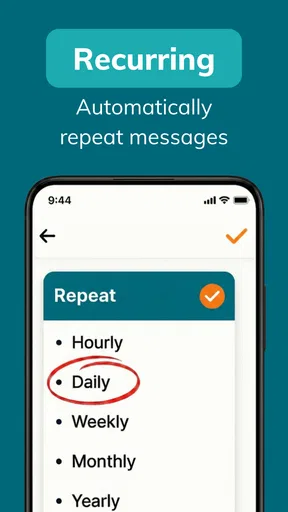
Another feature that I found super handy is the ability to set recurring messages. Let’s say you need to remind your team every Monday morning about a weekly meeting. Instead of setting a reminder every week, you can set it once and let the app do the rest. It’s these little conveniences that make life so much easier.
Security and Privacy
In today’s digital age, privacy is crucial. The app has robust security measures in place to ensure your messages and data are kept safe. You can schedule with peace of mind, knowing your information won’t fall into the wrong hands.
Why You Might Love It
If you’re someone who likes to plan ahead or if you have a tendency to forget important dates and messages, this app is a lifesaver. It’s not just about convenience; it’s about efficiency. Imagine never missing a birthday wish or a meeting reminder again. That’s the kind of reliability we all need in our busy lives.
Room for Improvement
While the app does a fantastic job, there are a few areas where it could get even better. For instance, integrating with more third-party apps could enhance its functionality. Also, a few more options for message customization wouldn’t hurt. But hey, no app is perfect, right?
In conclusion, Auto Text - Schedule Messages is a nifty little tool that can make your life a whole lot easier. Whether you’re juggling multiple commitments or just want to ensure you never forget an important message again, this app has got your back. So, go ahead, give it a whirl, and see how it can transform your messaging game. Trust me; you won’t look back!
Ready to try it out? You can download it directly from the app store and start scheduling your messages today. Happy texting!
Pros
- Easily schedule messages for future delivery.
- Supports multiple messaging platforms.
- User-friendly interface with intuitive navigation.
- Customizable templates for frequent messages.
- No ads in the premium version.
Cons
- Limited features in the free version.
- Occasional delays in message sending.
- Requires internet connection for scheduling.
- No integration with social media apps.
- Some features locked behind paywall.
FAQs for Auto Text - Schedule Messages
What is Auto Text - Schedule Messages and how does it work?
Auto Text - Schedule Messages is an app designed to help users schedule messages to be sent at a later time. It allows you to set specific dates and times for your messages to be delivered, ensuring you never forget important communications. Simply compose your message, set the delivery schedule, and the app takes care of the rest.
Can I use Auto Text - Schedule Messages with any messaging platform?
Auto Text - Schedule Messages supports a variety of popular messaging platforms, including SMS and some social media apps. However, compatibility may vary depending on the platform and device you are using. It’s important to check the app’s documentation or support to ensure it works with your preferred messaging service.
Is it safe to use Auto Text - Schedule Messages on my device?
Yes, Auto Text - Schedule Messages prioritizes user privacy and data security. The app typically requires access to your contacts and messaging services to function properly, but it doesn’t store your personal data on external servers. Always review the app's privacy policy to understand how your data is handled.
What are the main features of Auto Text - Schedule Messages?
The app offers features such as customizable message scheduling, recurring message options, and a user-friendly interface for easy navigation. It also includes reminders for upcoming scheduled messages and the ability to manage multiple schedules at once. These features make it a versatile tool for personal and professional use.
Are there any limitations or restrictions when using Auto Text - Schedule Messages?
While Auto Text - Schedule Messages is a powerful tool, it may have limitations depending on your device and operating system. Some features might not work if the app is not running in the background, and there may be restrictions on the number of messages you can schedule at once. Regular updates can help mitigate some of these issues.


